

 Russian
  English
  Arabic
  German
  French
  Spanish
  Turkish
  Italian
  Persian
  Bengali
  Hebrew
  Persian (Afghanistan)
  Scottish Gaelic
  Panjabi
  Croatian
  Slovenian
  Greek
Greek  Afrikaans
  Czech
Czech  Korean
  Japanese
  Portuguese









UV Printer Negative Pressure System Explained: How It Affects Ink Flow and Print Stability
А UV printer negative pressure system is one of the most important parts of the ink-delivery system, yet it is often ignored until something goes wrong. A machine may suddenly begin dripping ink from the printhead, losing nozzles during long jobs, showing unstable nozzle tests, or recovering after cleaning only to fail again several minutes later.
In many of these situations, the printhead is blamed first. However, the root cause may actually be the ink-supply pressure.
UV printheads need ink to remain in a very specific position at the nozzle opening before each droplet is fired. The ink cannot be pushed so far forward that it leaks from the nozzle plate, but it also cannot be pulled so far backward that the nozzle cannot refill correctly. The negative pressure system creates a small, controlled vacuum that helps maintain this balance.
The basic relationship is simple:
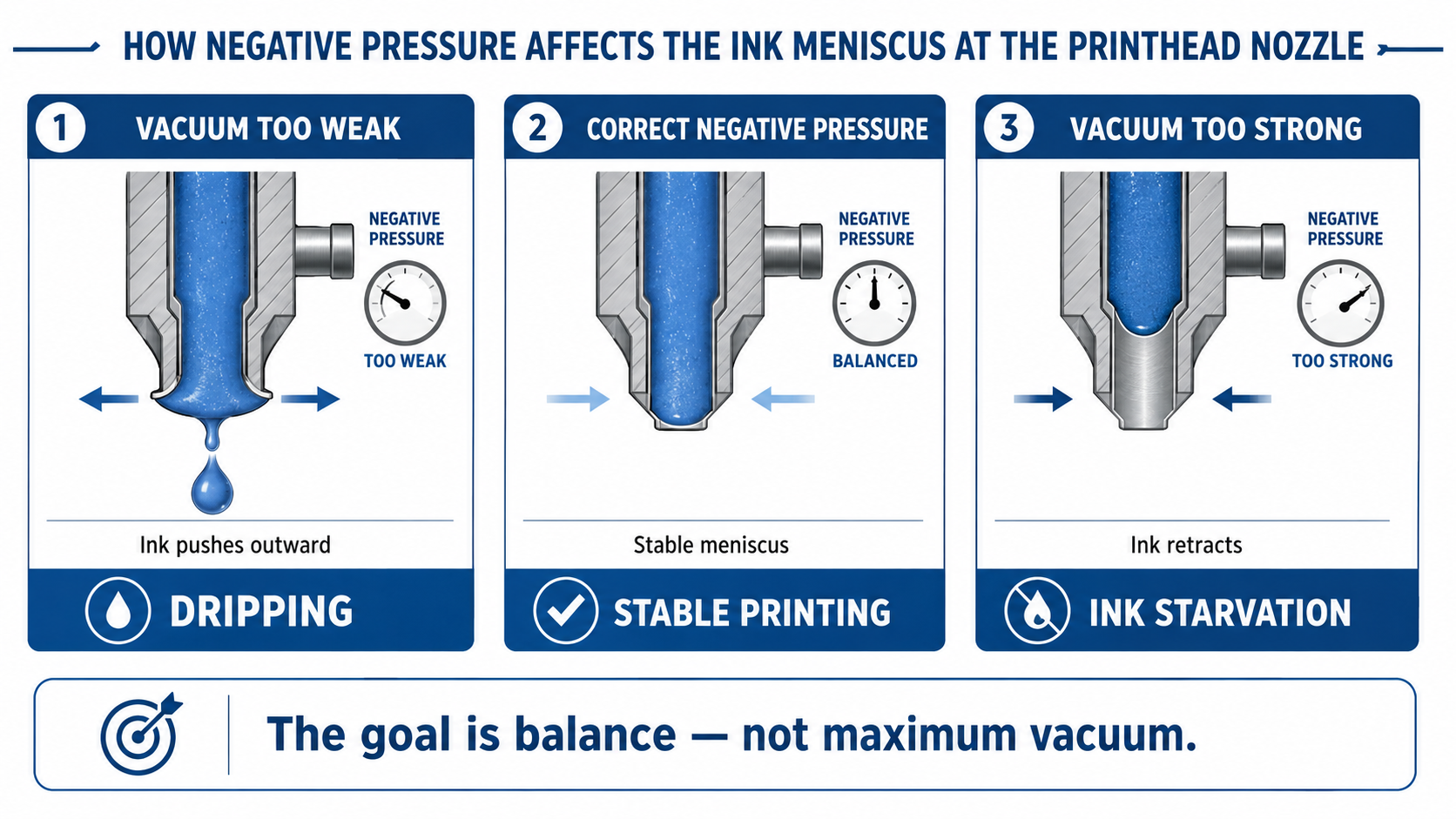
Vacuum too weak → ink dripping and nozzle-plate flooding
Correct vacuum → stable meniscus and reliable jetting
Vacuum too strong → ink starvation and missing nozzles
But the real system is more complex than adjusting one pressure number. Sub-tank height, ink viscosity, temperature, filters, pumps, air lines, pressure sensors, solenoid valves, liquid levels and circulation all influence how the printhead receives ink.
This guide explains how UV printer negative pressure works, why unstable pressure causes dripping or ink starvation, how the main components interact, and what buyers should check before choosing a UV printer.
What Is a UV Printer Negative Pressure System?
A UV printer negative pressure system creates and regulates a small vacuum in the ink-supply system to keep the ink meniscus in the correct position at the printhead nozzles.
It is important to understand that the purpose is not to “suck the ink backward as strongly as possible.” The system is designed to create balance.
A simplified way to think about the system is:
Gravity + Hydrostatic Ink Pressure + Flow Resistance + Controlled Vacuum = Stable Ink Position at the Nozzle
This is not a literal engineering formula, but it helps explain why negative pressure cannot be evaluated independently from the rest of the printer.
If the sub-tank is positioned above the printhead, the height difference itself creates hydrostatic pressure that tends to push ink downward toward the nozzle. Negative pressure is used to counteract that force and prevent uncontrolled leakage.
If the vacuum becomes too strong, however, the balance shifts in the opposite direction. Ink is pulled too far back, making nozzle refill more difficult during sustained printing.
The best negative pressure system therefore does not create the strongest vacuum. It maintains the correct and stable pressure for the printhead, ink and machine architecture.
View manufacturer information about negative pressure and stable ink ejection
What Is the Ink Meniscus and Why Does It Matter?
The word meniscus refers to the curved surface where the liquid ink meets the air at the nozzle opening.
Before a printhead fires a droplet, ink must sit at a controlled position inside the nozzle. Ideally, the surface is held slightly inward rather than bulging outward.
This small pressure balance is critical because the nozzle opening is extremely small.
Vacuum Too Weak
If negative pressure is insufficient, the ink meniscus can move outward. Gravity and ink-supply pressure may then push ink toward or beyond the nozzle opening.
The nozzle plate may become wet, individual droplets may form underneath the head, or ink may begin dripping while the printer is idle.
Correct Negative Pressure
When pressure is properly controlled, the meniscus remains slightly inside the nozzle while ink is still available for rapid refill after each droplet is fired.
This condition supports:
- Stable droplet formation
- Consistent nozzle refill
- Clean nozzle-plate surfaces
- Reduced uncontrolled dripping
- Reliable high-coverage printing
Vacuum Too Strong
If excessive vacuum pulls the ink too far inward, nozzle refill can become restricted. The head may initially print correctly but gradually lose nozzles as the job continues.
This is why negative pressure should always be treated as a balance problem, not a maximum-vacuum problem.
Vacuum Too Weak: Why Does the Printhead Drip Ink?
When negative pressure is too weak, or the vacuum level cannot be maintained, the ink supply may begin pushing ink toward the printhead nozzles.
Common symptoms include:
- Ink dripping from the nozzle plate
- Wet printhead surface
- Ink beads forming under the printhead
- Ink collecting in the cap station
- Cross-contamination between nearby channels
- Unstable droplet formation
- Ink leakage while the machine is idle
Possible causes include:
- Weak or damaged vacuum pump
- Air leak in the negative-pressure tube
- Loose pneumatic fitting
- Leaking solenoid valve
- Incorrect pressure setpoint
- Pressure sensor error
- Sub-tank liquid level too high
- Sub-tank positioned too high relative to the printhead
- Faulty pressure regulator
One important diagnostic clue is whether several channels begin dripping at the same time.
If multiple printheads or ink channels suddenly become wet simultaneously, a shared system-level pressure problem may be more likely than independent mechanical damage to every nozzle.
However, dripping should never be diagnosed from pressure alone. Printhead damage, abnormal ink, excessive heat, contaminated nozzle surfaces and maintenance-system problems may create similar symptoms.
Vacuum Too Strong: Why Does the Printer Lose Ink Flow?
Excessive negative pressure creates a different failure mode.
Instead of pushing ink outward, the system pulls ink too far back from the nozzle opening.
During a short nozzle test, the printhead may appear normal because the ink demand is low. During a long, high-coverage production job, however, the printhead needs continuous and rapid ink refill.
If the vacuum is too strong, refill cannot keep up with consumption.
Possible symptoms include:
- Missing nozzles during production
- Gradual loss of white or color output
- Banding that becomes worse during long jobs
- Ink starvation at high coverage
- Nozzle test becomes worse after several minutes
- Nozzles recover after cleaning and then fail again
- Air entering through weak fittings or seals
The simplified process is:
Excessive Vacuum → Ink Pulled Backward → Meniscus Retracts → Nozzle Refill Slows → Missing Dots / Ink Starvation
This failure can easily be mistaken for a clogged printhead.
If nozzles repeatedly return after cleaning but disappear during sustained printing, the technician should investigate pressure and ink-supply flow before concluding that the nozzles are permanently blocked.
Stable Pressure Is More Important Than a Universal Number
One of the most common questions is:
“What negative pressure value should I use for my UV printer?”
There is no universal value that is correct for every machine.
The required pressure depends on factors including:
- Printhead model
- Ink viscosity
- Ink formulation
- Ink temperature
- Sub-tank height
- Printhead height
- Tube diameter
- Ink-filter resistance
- Damper or manifold structure
- White ink circulation design
- Manufacturer control strategy
For that reason, copying a pressure setting from another printer—even one using the same printhead—can be risky.
The more useful question is whether pressure remains stable around the manufacturer’s target while the printer is:
- Idle
- Printing low coverage
- Printing high coverage
- Running white ink
- Changing carriage direction
- Performing circulation
A pressure number that looks correct on the screen but fluctuates significantly during real printing may still produce unstable ink flow.
Pressure stability around the correct target can be as important as the target value itself.
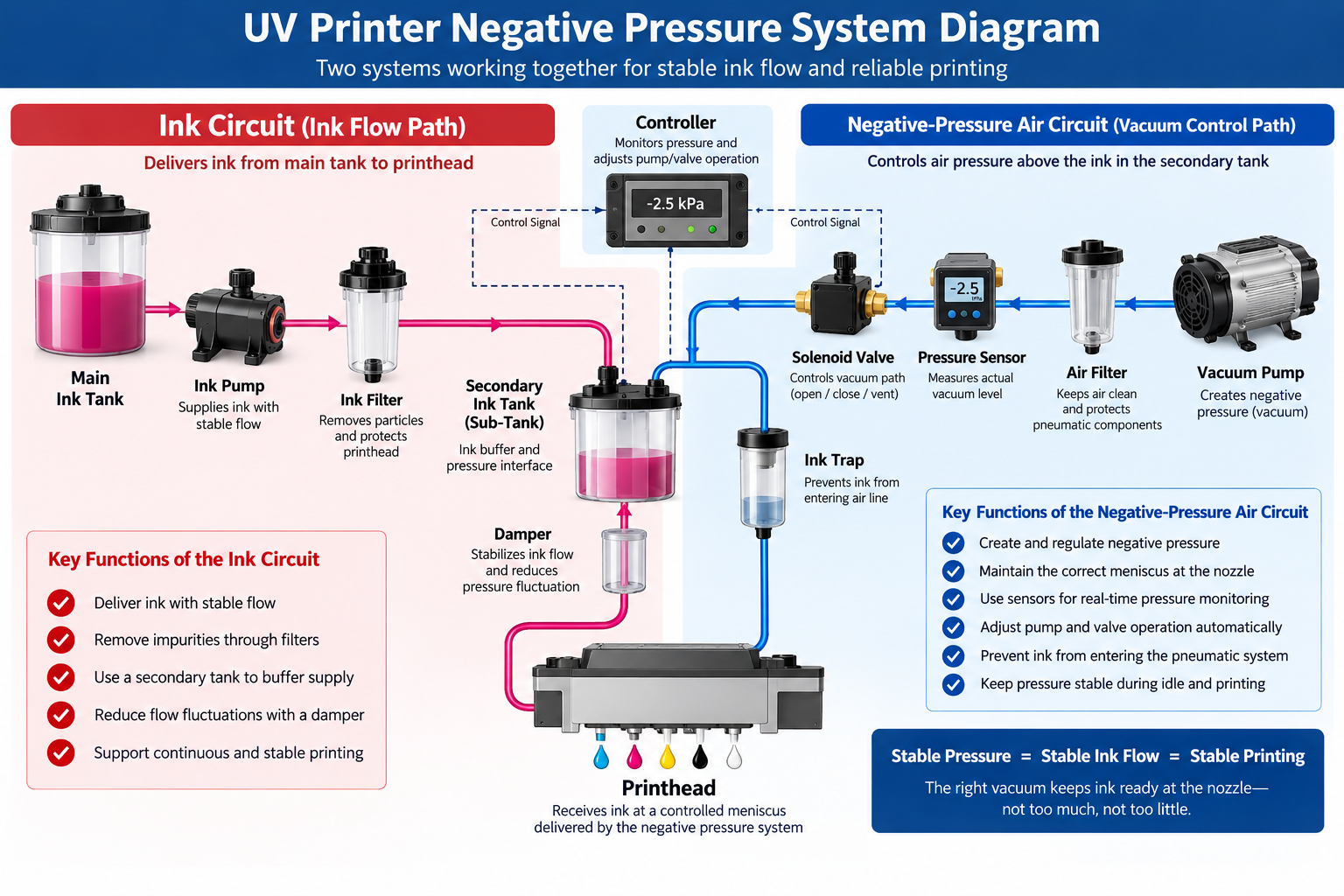
Ink Circuit vs Air Circuit: Understanding the Two Systems
Another common misunderstanding is assuming that the vacuum pump directly pumps ink.
In many UV printer architectures, the ink circuit и negative-pressure air circuit are separate systems.
Ink Circuit
A typical ink path may look like:
Main Ink Tank → Ink Pump → Filter → Secondary Tank → Damper / Manifold → Printhead
This circuit physically transports ink.
Negative-Pressure Air Circuit
A simplified vacuum path may look like:
Vacuum Pump → Air Filter → Pressure Sensor / Regulator → Solenoid Valve → Sub-Tank Air Chamber
The vacuum pump controls the air pressure above the ink inside the secondary tank. That pressure then indirectly controls the ink meniscus at the printhead.
This is an important distinction because a printer can have excellent ink delivery but unstable pneumatic pressure—or good pressure regulation but restricted ink flow.
Both systems need to work correctly.
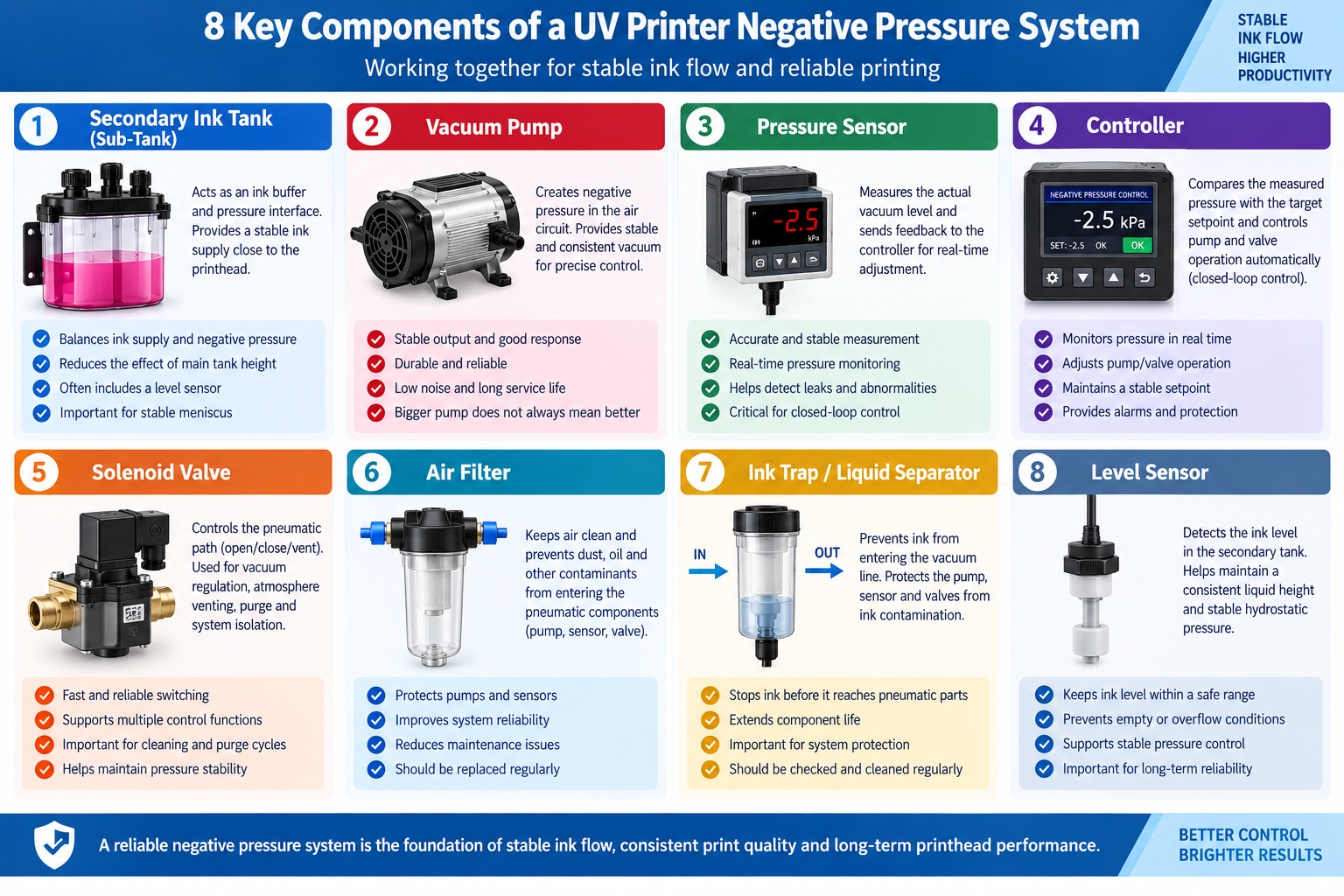
Key Components of a UV Printer Negative Pressure System
1. Secondary Ink Tank / Sub-Tank
The secondary tank acts as an ink buffer close to the printhead. It can reduce the dependence on the main tank and create a controlled interface between ink supply and the negative-pressure system.
Its liquid level is important because changing ink height changes hydrostatic pressure.
2. Vacuum Pump
The vacuum pump creates the negative pressure required by the system.
A larger or stronger pump is not automatically better. Important factors include:
- Stable output
- Response speed
- Прочность
- Noise
- Ability to hold the required setpoint
3. Pressure Sensor
The pressure sensor measures the actual vacuum level and provides feedback to the controller.
Without reliable measurement, the machine cannot know whether the pressure is too weak, too strong or unstable.
4. Controller
The controller compares the measured pressure with the target setpoint and adjusts pumps or valves.
This creates a basic closed-loop system:
Pressure Sensor → Controller → Compare with Setpoint → Pump / Valve Adjustment → Pressure Sensor
5. Solenoid Valve
Solenoid valves can open, close or switch pneumatic paths. Depending on the design, they may be involved in:
- Vacuum control
- Atmospheric venting
- Pressure isolation
- Cleaning or purge sequences
- Switching between different pressure states
6. Air Filter
The air filter helps protect pumps, sensors and valves from contamination in the pneumatic circuit.
7. Ink Trap / Liquid Separator
An ink trap protects the pneumatic system if ink accidentally enters the vacuum line.
Without this protection, ink can contaminate:
- Pressure sensors
- Solenoid valves
- Vacuum pumps
- Air tubing
8. Level Sensor
The sub-tank level sensor helps maintain consistent liquid height. Because ink height affects hydrostatic pressure, level stability is part of overall pressure stability.
How Pressure Sensors and Pumps Work Together
Modern UV printers commonly use feedback control rather than relying only on a fixed mechanical vacuum.
Suppose the machine has a target pressure value.
If measured vacuum becomes too weak:
Sensor Detects Change → Controller Responds → Pump or Valve Increases Vacuum → Pressure Returns Toward Target
If vacuum becomes too strong:
Sensor Detects Change → Controller Reduces Suction or Adjusts Valve → Pressure Returns Toward Target
The quality of this control depends on more than sensor accuracy.
The system also needs:
- Fast enough response
- Stable pump performance
- Low pneumatic leakage
- Correct valve operation
- Appropriate controller logic
A printer can technically “have a negative-pressure pump” while still using a poorly controlled pressure system.
For buyers, the more important question is whether pressure is actively measured and regulated during production.
Why Does UV Printer Negative Pressure Fluctuate?
Unstable pressure can originate from several parts of the machine.
Pneumatic-Side Causes
- Loose air fitting
- Cracked pneumatic tube
- Leaking solenoid valve
- Worn vacuum pump
- Blocked air filter
- Ink contamination inside the air circuit
- Pressure sensor drift
Ink-Side Causes
- Abnormal sub-tank level
- Restricted ink filter
- Blocked damper
- Air bubbles
- High ink viscosity
- Insufficient main ink-pump output
Control-Side Causes
- Incorrect setpoint
- Unstable pressure-sensor signal
- Slow control response
- Incorrect solenoid switching
- Firmware or calibration issues
Environmental and Mechanical Factors
Temperature can change ink viscosity. Changes in tank position, carriage movement or system vibration may also expose weaknesses in an already marginal pressure system.
This is why troubleshooting should examine the complete machine rather than replacing one component immediately.
Why Ink Dripping Is Not Always a Printhead Failure
When ink appears underneath the printhead, many operators immediately assume the head is damaged.
Sometimes that is correct, but not always.
Dripping can also result from:
- Vacuum too weak
- Vacuum leak
- Sub-tank liquid level too high
- Incorrect sub-tank height
- Faulty solenoid valve
- Pressure-sensor error
- Air-circuit contamination
If the nozzle plate becomes wet across several channels simultaneously, check common pressure components before assuming every printhead has failed.
Likewise, if dripping disappears immediately after correcting pressure, replacing the head would have been unnecessary.
For information about printhead reliability and maintenance, see our UV printhead life and maintenance guide.
Why Missing Nozzles Are Not Always Clogged Nozzles
Missing nozzles can also be misleading.
A permanently blocked nozzle may fail consistently. An ink-starvation problem can behave differently.
For example:
Step 1: Perform cleaning.
Step 2: Nozzle test becomes perfect.
Step 3: Start a high-coverage print job.
Step 4: Nozzles gradually disappear again.
This pattern suggests that the printhead can fire, but the ink supply may not be able to refill the head fast enough.
Possible causes include:
- Excessive negative pressure
- Restricted filter
- Weak ink pump
- Damper restriction
- Air entering the ink path
- Incorrect tank level
- High viscosity
- Pressure instability
A nozzle that recovers after cleaning but disappears during sustained printing may be suffering from ink starvation rather than permanent blockage.
For a broader diagnosis, see our UV printer banding and missing-nozzle troubleshooting guide.
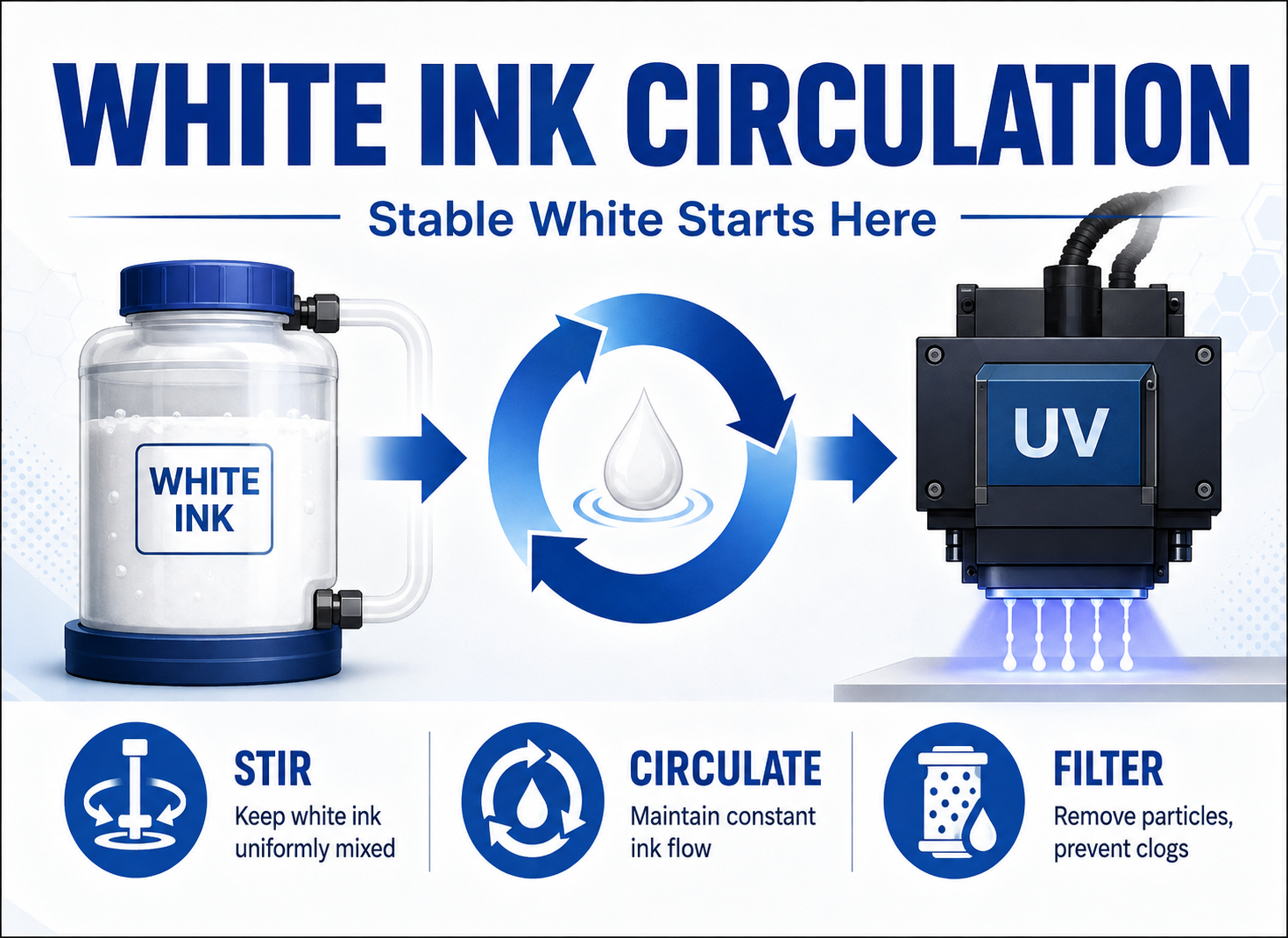
Negative Pressure and White Ink Circulation Must Work Together
Negative pressure and white ink circulation solve different problems.
White ink circulation helps keep dense pigment moving and reduces sedimentation inside selected parts of the ink path.
Negative pressure helps maintain the correct ink position at the printhead nozzle.
The simplest distinction is:
Circulation manages ink movement; negative pressure manages ink position at the nozzle.
However, the two systems interact.
If white ink circulation creates large flow or pressure changes inside the sub-tank while the negative-pressure controller responds slowly, the nozzle meniscus may fluctuate.
A well-designed machine therefore coordinates:
- Circulation pump operation
- Sub-tank level
- Pressure sensor feedback
- Vacuum control
- Printing demand
For a detailed explanation, read our UV printer white ink circulation system guide.
Negative Pressure During Printing vs Cleaning and Purging
The pressure condition required during normal printing is not necessarily the same as the pressure condition used during cleaning or purging.
During normal jetting, the printer usually needs a controlled slight vacuum to maintain the meniscus.
During cleaning, the machine may temporarily use:
- Cap-station suction
- Ink pumping
- Valve switching
- Temporary positive or altered pressure conditions
- Dedicated purge cycles
These operations are designed to move ink through the printhead more aggressively than normal printing.
Therefore, users should not assume that a cleaning pressure setting should be copied into the normal printing pressure configuration.
View technical information about printhead meniscus and purge pressure control
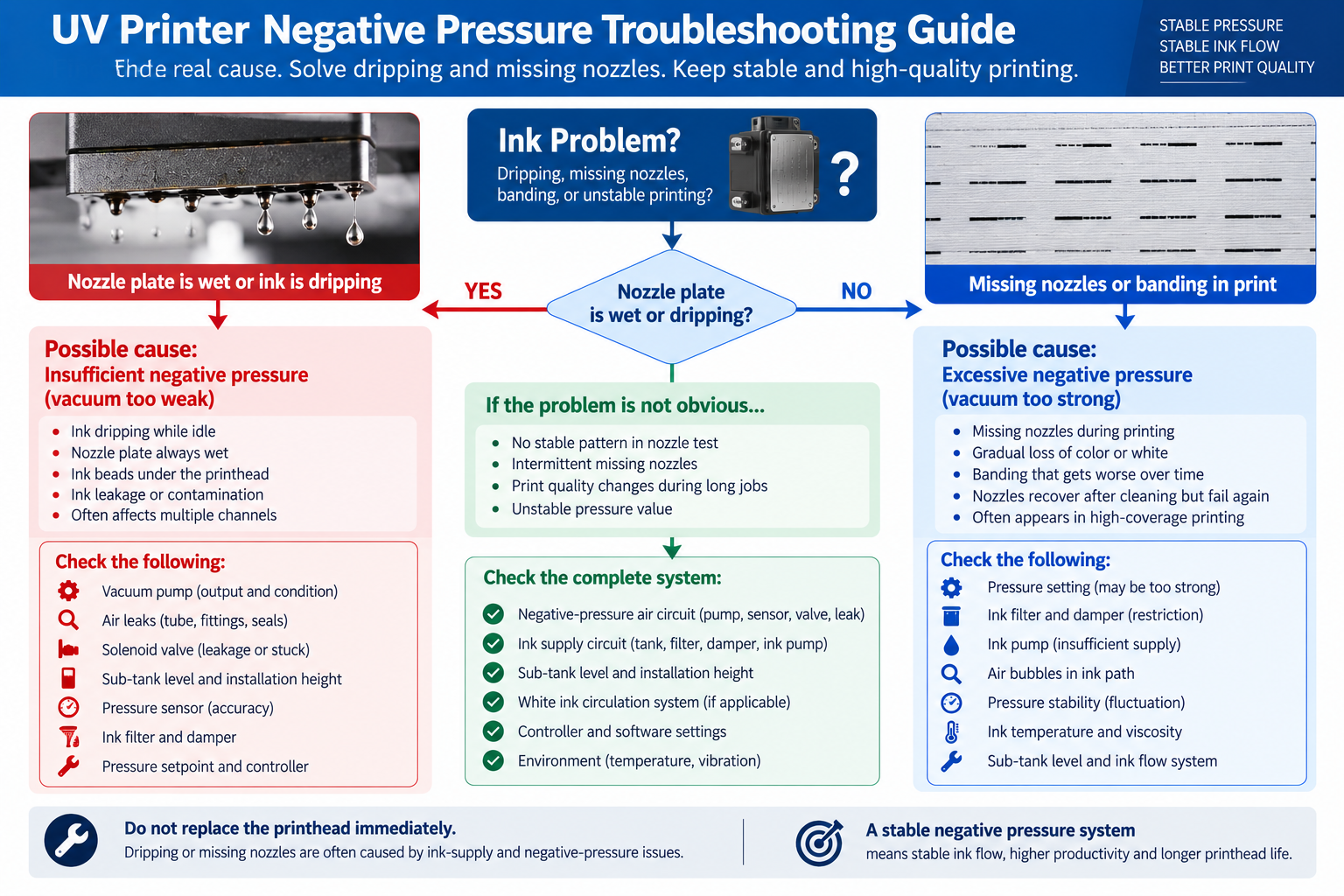
UV Printer Negative Pressure Troubleshooting Guide
| Symptom | Possible Pressure Issue | Other Components to Check |
|---|---|---|
| Ink drips while idle | Vacuum too weak | Pump, valve, air leak, tank level |
| Nozzle plate always wet | Insufficient negative pressure | Tank height, sensor, regulator |
| Nozzles disappear during printing | Vacuum too strong or unstable | Filter, damper, ink pump, air bubbles |
| Nozzles recover after cleaning | Possible ink starvation | Pressure, filter, damper, ink supply |
| Pressure value jumps repeatedly | Leak or sensor instability | Tube, fittings, sensor, solenoid valve |
| Vacuum pump runs constantly | System cannot reach target | Air leak, worn pump, leaking valve |
| Only one color loses flow | Local pressure or supply problem possible | Damper, filter, local tube, printhead |
| Multiple channels drip together | Shared negative-pressure issue possible | Common vacuum path, pump, sensor |
Do Not Judge the System by the Pressure Display Alone
Many UV printers display a negative-pressure number on the control panel.
A stable number is useful, but it does not automatically prove that the complete pressure system is healthy.
For example:
- The pressure sensor may be incorrectly calibrated.
- A leak may exist downstream from the sensor.
- A solenoid valve may be partially stuck.
- The sub-tank level may be abnormal.
- A local ink line may be restricted.
In these cases, the screen may show a value that appears acceptable while the actual printhead still experiences unstable ink conditions.
A better diagnosis combines:
- Pressure reading
- Nozzle test
- Nozzle-plate condition
- Pump operating frequency
- Sub-tank liquid level
- Air-leak inspection
- Ink-flow behavior under high coverage
System behavior during real printing is more valuable than one static number.
12 Questions to Ask Before Buying a UV Printer
If you are comparing UV printer configurations, do not ask only whether the machine “has negative pressure.” Use the following questions.
1. Does the Printer Use Active Negative-Pressure Control?
Ask whether pressure is actively regulated or relies mainly on passive mechanical design.
2. Does the System Have a Pressure Sensor?
Real-time measurement allows the controller to detect pressure changes.
3. Is Negative Pressure Continuously Monitored?
Continuous monitoring can help identify leaks, pump failure and unstable pressure.
4. Is the System Closed-Loop Controlled?
Ask whether sensor feedback automatically adjusts pumps or valves.
5. Are Different Ink Groups Controlled Separately or Together?
Separate control can simplify diagnosis and allow different pressure requirements, depending on machine architecture.
6. Where Is the Negative Pressure Applied?
Ask whether it controls the secondary tank, manifold or another section of the system.
7. Does the Secondary Tank Have a Level Sensor?
Stable liquid level helps keep hydrostatic pressure consistent.
8. Is There an Ink Trap Protecting the Vacuum Circuit?
This can protect expensive pneumatic components if ink enters the air line.
9. What Happens if the Vacuum Pump Fails?
Ask whether the machine has alarms or protection logic.
10. Does the Printer Display a Negative-Pressure Alarm?
Automatic alarms can make troubleshooting faster.
11. How Does Negative Pressure Interact with White Ink Circulation?
This is especially important on machines with strong white ink circulation.
12. Can You Show Me the Ink and Pneumatic Flow Diagram?
A system diagram can reveal far more than a marketing specification.
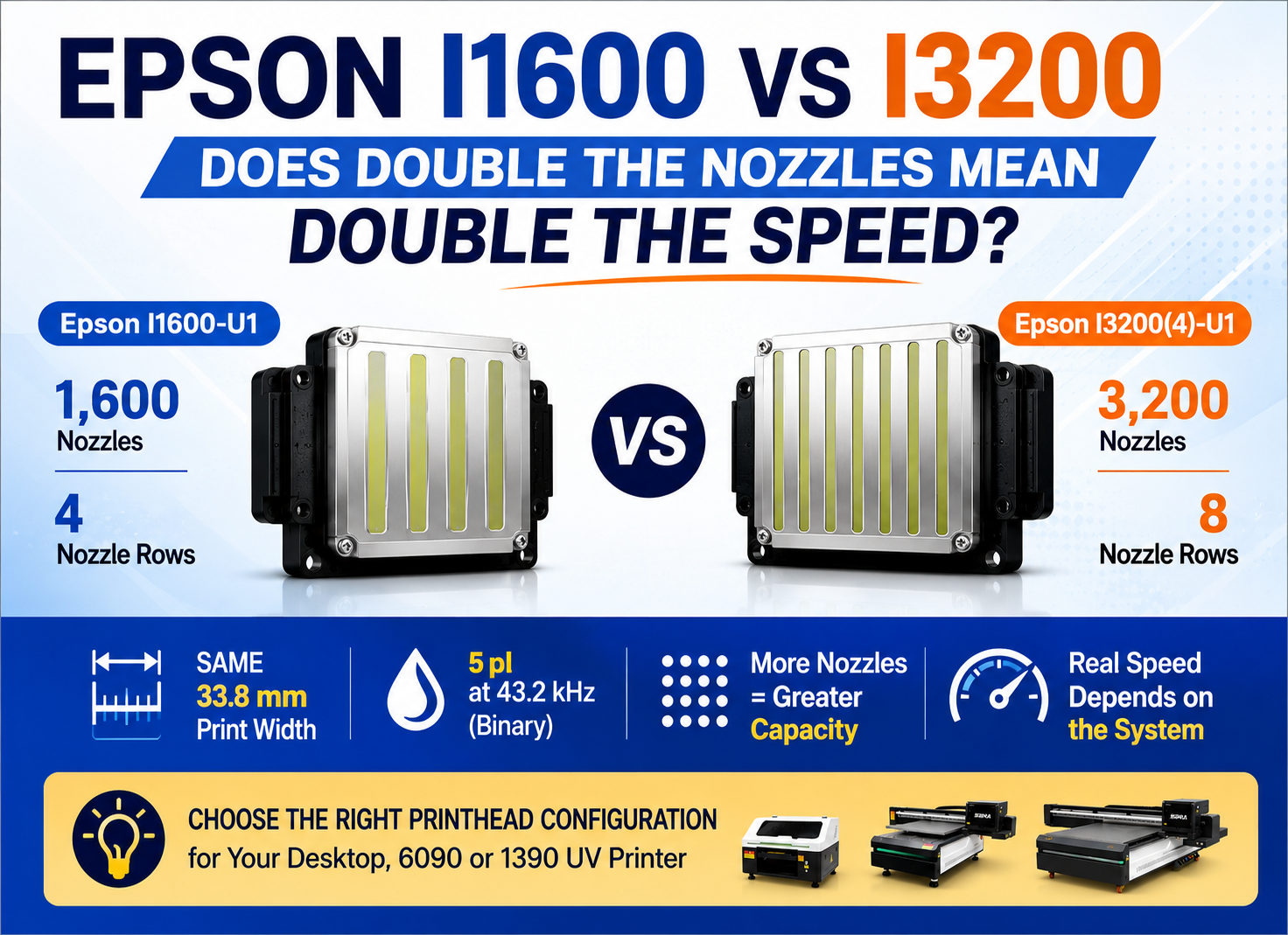
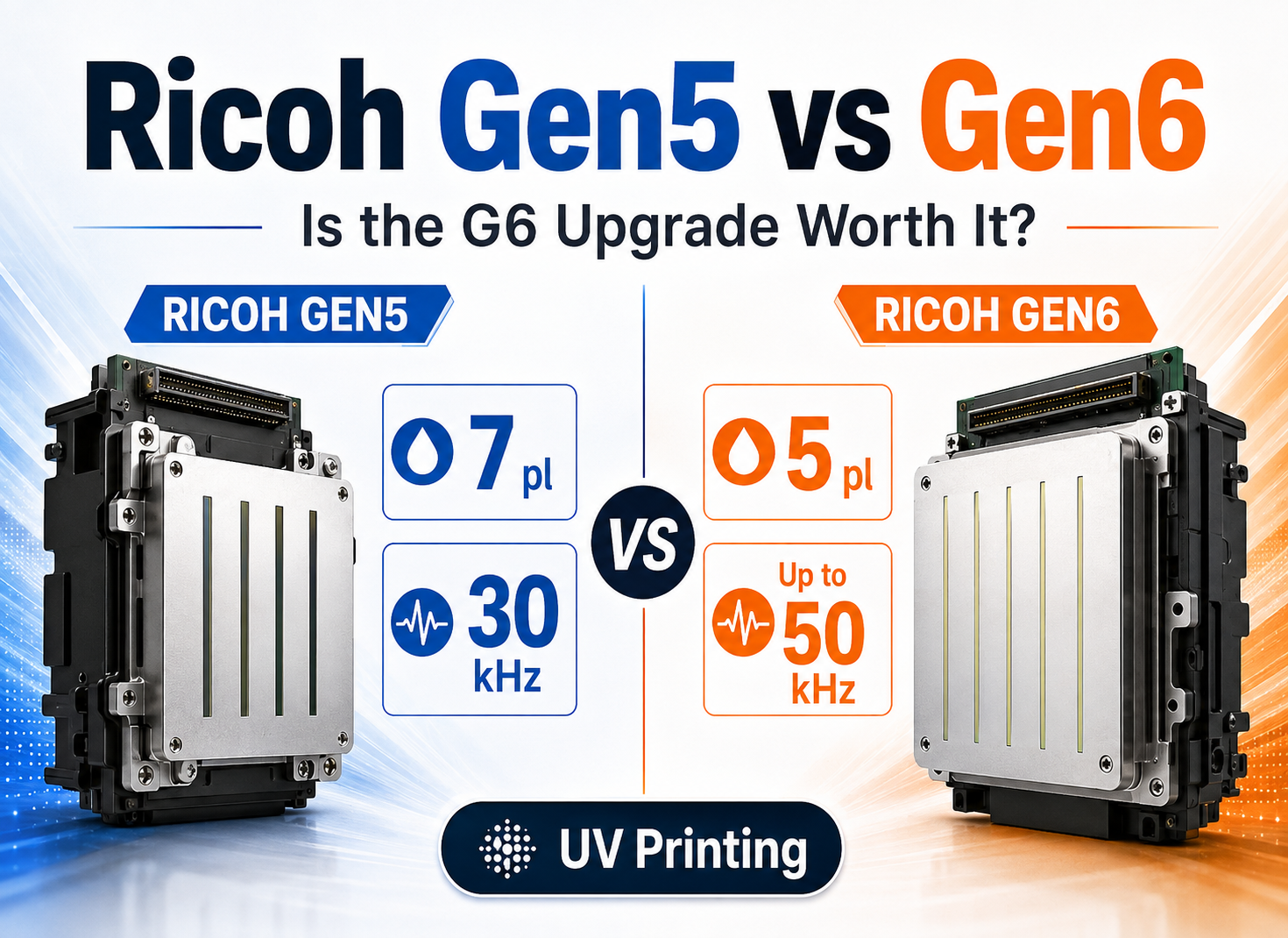
If you are also comparing complete printhead configurations, see our Epson I1600 vs I3200 comparison и Ricoh Gen5 vs Gen6 comparison.
Negative Pressure Requirements for Desktop, 6090 and 1390 UV Printers
Desktop / A3 UV Printers
Compact UV printers normally have shorter ink paths and lower total ink consumption. The negative-pressure system can therefore be relatively simple, but it still needs reliable sensors, stable sub-tank levels and good leak resistance.
See our Desktop UV Printer решения.
6090 UV Flatbed Printers
A 6090 machine often operates for longer periods and may use separate white, color and varnish channels. Stable negative pressure becomes more important during high-coverage printing.
Buyers should pay attention to:
- Independent ink-channel control
- Sub-tank level management
- Pressure sensors
- Vacuum alarms
- White ink circulation interaction
- Filter and damper capacity
Узнайте больше о наших 6090 UV Flatbed Printer конфигурации.
1390 UV Flatbed Printers
A 1390-class printer has longer carriage travel and is usually expected to produce larger jobs and higher daily output. Stable ink refill becomes especially important when multiple printheads operate simultaneously.
For these machines, evaluate:
- Multi-head pressure stability
- Independent pressure circuits
- Vacuum pump capacity
- Sensor accuracy
- Sub-tank design
- White ink circulation integration
- Ink-trap protection
- High-coverage refill performance
View our 1390 UV Flatbed Printer options for larger-format production.
UV Printer Negative Pressure System: Final Recommendation
Надежный UV printer negative pressure system does not create the strongest possible vacuum. Its job is to maintain the correct ink meniscus at the nozzle while allowing the printhead to refill quickly and consistently during production.
Remember the three basic conditions:
- Vacuum too weak: ink may push outward and cause dripping or nozzle-plate flooding.
- Correct vacuum: ink remains ready at the nozzle with a stable meniscus.
- Vacuum too strong: ink may retract too far and cause ink starvation or missing nozzles.
Long-term stability depends on the complete system:
- Secondary ink tank
- Vacuum pump
- Pressure sensor
- Controller
- Solenoid valves
- Air tubing
- Ink trap
- Level sensor
- Ink filter
- Damper
- Ink temperature
- White ink circulation
When evaluating a UV printer, do not ask only:
“What negative pressure value does this machine use?”
Ask instead:
“How does the printer measure, regulate and protect negative pressure during real production?”
That question tells you far more about ink-flow stability than a single pressure number on a specification sheet.
Frequently Asked Questions About UV Printer Negative Pressure
What does negative pressure do in a UV printer?
Negative pressure helps hold ink at the correct position inside the printhead nozzle. It prevents uncontrolled dripping while still allowing the nozzle to refill after each droplet is fired.
Why is my UV printer dripping ink from the printhead?
One possible cause is insufficient negative pressure. Other causes can include a high sub-tank level, air leaks, faulty valves, printhead damage or abnormal ink conditions. The complete ink and pneumatic systems should be checked.
What happens if UV printer negative pressure is too strong?
Excessive vacuum can pull ink too far back from the nozzle, slowing refill and causing ink starvation, missing nozzles and banding during sustained printing.
What happens if negative pressure is too weak?
If the vacuum is too weak, hydrostatic pressure may push ink toward the nozzle plate, causing wet nozzles, drooling or ink dripping while the machine is idle.
What negative pressure should a UV printer use?
There is no universal value. The correct setpoint depends on the printhead, ink viscosity, temperature, sub-tank height, ink path and printer design. Always follow the manufacturer’s specification.
Why do nozzles recover after cleaning and then disappear again?
This can indicate ink starvation rather than permanent clogging. Possible causes include excessive negative pressure, restricted filters, weak ink supply, damaged dampers, air bubbles or unstable pressure.
Can an air leak cause UV printer ink starvation?
Yes. Depending on the system design and location of the leak, air leakage can prevent stable vacuum control or introduce air into the ink path, resulting in unstable ink supply.
How can I tell whether a UV printer has a good negative pressure system?
Look for active pressure sensing, closed-loop control, stable sub-tank level management, reliable pumps and valves, ink-trap protection, alarms and clear integration with the ink-supply and circulation systems.