

 Czech
Czech  English
  Arabic
  German
  French
  Spanish
  Turkish
  Italian
  Russian
  Persian
  Bengali
  Hebrew
  Persian (Afghanistan)
  Scottish Gaelic
  Panjabi
  Croatian
  Slovenian
  Greek
Greek  Afrikaans
  Korean
  Japanese
  Portuguese








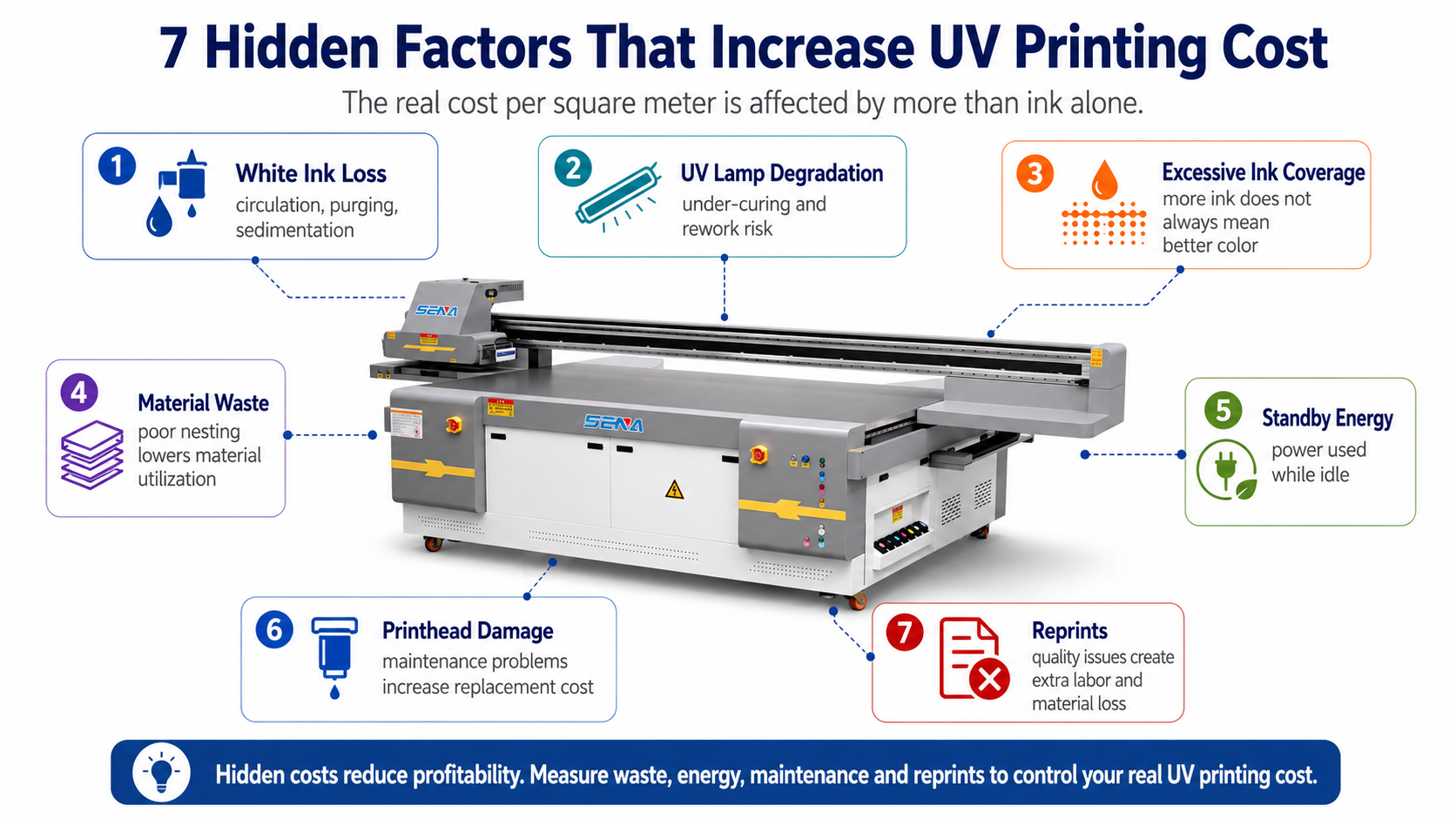
7 Hidden Factors That Drive Your UV Printing Cost
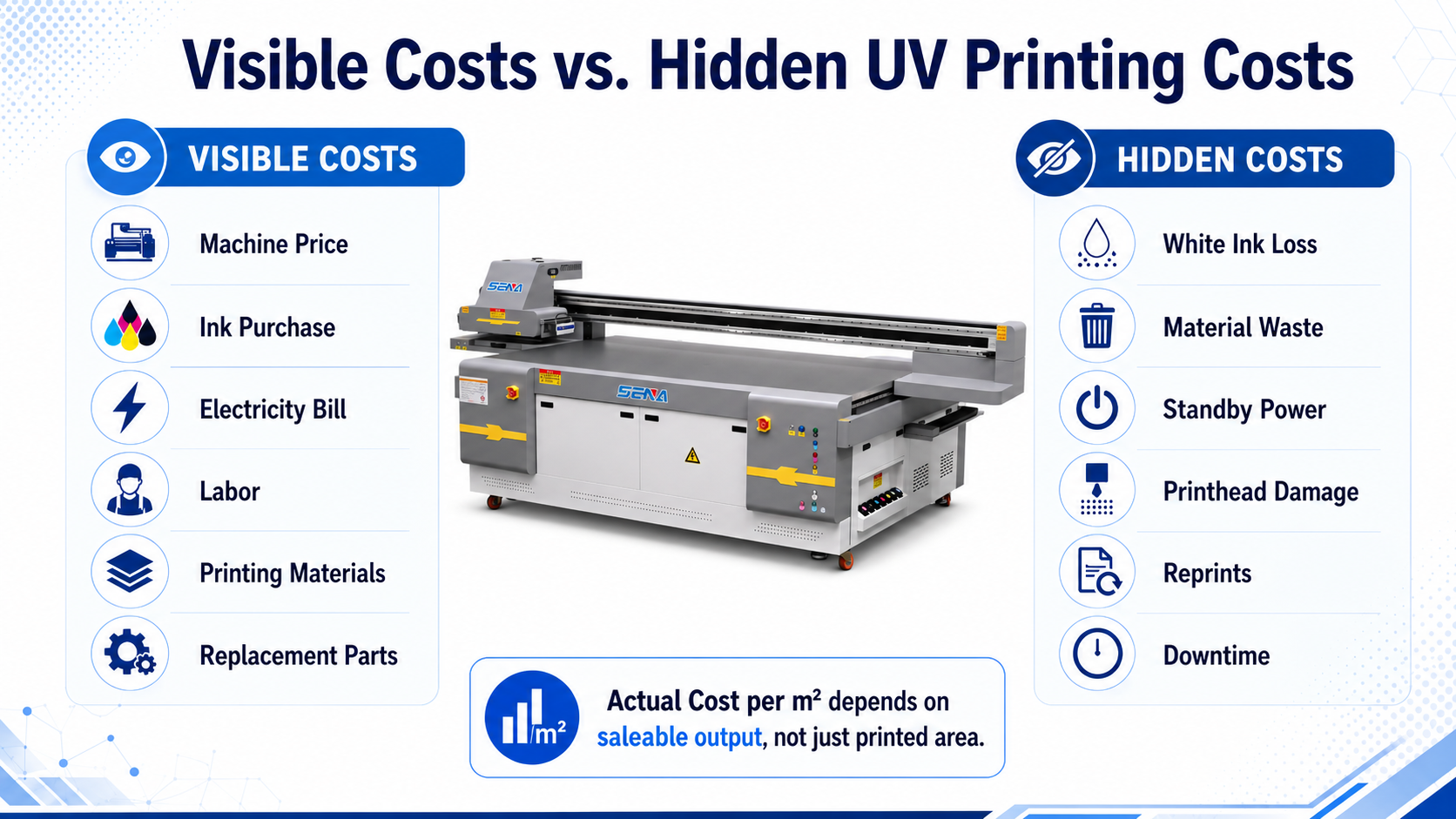
Ink price, electricity and labor are easy to see on an invoice. However, many of the most damaging
hidden UV printing costs do not appear clearly in a monthly expense report.
White ink loss, inefficient layouts, standby power consumption, premature printhead failure and customer reprints can gradually reduce the profit of every order.
A print job may appear profitable when it is quoted, but the final margin can be much lower after cleaning waste,
rejected materials, additional labor and production delays are included. This guide explains seven commonly overlooked
factors that increase the actual UV printing cost per square meter. It also shows how to monitor these losses and control them through better production management.
The real cost of UV printing is not limited to ink applied to the final product.
It also includes ink lost during circulation and cleaning, material waste, standby energy,
shortened component life, reprints, additional labor and lost production time.
1. White Ink Circulation and Sedimentation Loss
White ink is one of the most important functions of a UV printer because it allows printing on dark,
colored and transparent materials. It is also one of the most easily underestimated operating costs.
Why White Ink Requires Continuous Management
White ink contains a high concentration of pigment. These pigments are heavier than the components in standard color ink
and may settle when the ink remains still for long periods.
A suitable white ink system normally uses circulation or agitation to maintain a more uniform ink condition.
However, circulation does not remove all waste. White ink may still be consumed during automatic maintenance,
nozzle checks, purging, filter replacement and extended idle periods.
Where White Ink Is Lost
- Automatic ink circulation and maintenance cycles
- Daily nozzle checks
- Automatic printhead cleaning
- Manual purging after nozzle problems
- Ink remaining in replaced filters, tubes and dampers
- Ink discharged during long-term shutdown procedures
- Multiple white layers that are not necessary for the application
- Rejected prints that require a full white underbase
How White Ink Loss Increases Cost per m²
Total White Ink Consumed ÷ Saleable White-Ink Printed Area
The amount consumed should include both ink applied to finished products and ink lost during maintenance.
Using only the theoretical RIP ink volume will usually underestimate the real white ink cost.
How to Monitor White Ink Consumption
- Record the quantity of white ink added each week
- Record the saleable area printed with white ink
- Count automatic and manual cleaning cycles
- Track how often filters and dampers are replaced
- Separate standard white printing from multi-layer embossed work
- Investigate sudden increases in waste ink
How to Reduce White Ink Waste
- Use only the number of white layers required for acceptable coverage
- Create separate print settings for transparent, dark and light materials
- Keep the white ink circulation system working correctly
- Avoid unnecessary repeated strong-cleaning cycles
- Follow the supplier’s short-term and long-term shutdown procedure
- Use ink that is compatible with the printer and printhead
For more information about controlling white ink and varnish layers, read:
White Ink, Varnish and Embossed Effects in UV Printing: A Complete Guide
.
2. UV Lamp Degradation and Rework
A UV lamp does not need to stop working completely before it begins to affect production.
Reduced UV output, contaminated lamp surfaces or incorrect curing settings may cause the ink to cure inadequately.
Why UV Curing Performance Changes
UV curing performance can be affected by the age of the lamp, operating hours, ink thickness,
lamp-to-material distance, printing speed, surface contamination and the transparency or reflectivity of the substrate.
If the printer operates faster without a corresponding adjustment in UV output, the ink may receive less curing energy.
Thick white ink, varnish and embossed layers may also require different curing conditions from standard CMYK printing.
Signs of Incomplete UV Curing
- The printed surface remains tacky
- Ink can be scratched easily
- Adhesion becomes weaker than previous production
- Varnish remains soft or uneven
- The print has a strong residual odor
- Ink separates after bending, cutting or packing
- Products pass initial inspection but fail after delivery
The Real Cost of Under-Curing
A curing problem is not limited to the cost of another UV lamp. It may create a complete second production cycle.
- New printing material
- Additional color, white and varnish ink
- Repeated file setup and positioning
- Additional operator time
- Repeated quality inspection
- Delayed delivery
- Express shipping or customer compensation
How to Monitor UV Curing Performance
- Record lamp operating hours
- Save tested power and speed settings for each material
- Inspect and clean lamp surfaces regularly
- Perform scratch, tape or adhesion tests before batch production
- Record every reprint caused by curing or adhesion problems
- Retest settings after changing ink, coating or substrate suppliers
3. Excessive Ink Coverage and Over-Printing
More ink does not always produce better color or stronger quality. Excessive ink coverage can increase cost,
reduce detail, slow curing and create adhesion problems.
How Incorrect Color Settings Waste Ink
A generic color profile may apply more ink than a specific material requires. Excessive total ink limits,
unnecessary printing passes and repeated color correction can all increase the UV ink cost per m².
Common causes include:
- An unsuitable ICC color profile
- An excessively high total ink limit
- Using high-resolution modes for work that does not require them
- Adding multiple white layers without testing the minimum effective coverage
- Applying full-area varnish when spot varnish would be sufficient
- Repeatedly printing the same color sample without recording settings
- Using the same print mode for every material and product
Hidden Costs Caused by Over-Inking
- Higher ink consumption
- Longer printing time
- Greater UV curing requirements
- Loss of small text or fine image detail
- Tacky surfaces or weak layer bonding
- Higher rejection and reprint rates
How to Control Ink Coverage
- Create material-specific RIP and ICC settings
- Use the lowest ink coverage that still meets quality requirements
- Separate standard, high-quality and high-density production modes
- Control white ink and varnish independently
- Save approved customer colors for repeated orders
- Compare test results before increasing pass count or ink density
4. Inefficient Layouts and Material Waste
In many UV printing applications, the substrate costs more than the ink.
This is especially true for acrylic sheets, glass, metal panels, wood boards, pre-cut products and customized packaging.
Common Layout Problems
- Leaving unnecessary space between products
- Using excessive margins around the board
- Printing a small order on a full sheet without combining jobs
- Failing to rotate products for better nesting
- Using inaccurate positioning methods
- Not saving reusable layouts for repeat orders
- Discarding offcuts that could be used for samples or smaller orders
Material Utilization Formula
Saleable Product Area ÷ Total Material Area × 100%
If only 70% of a board becomes saleable output, the remaining 30% must either be reused or treated as material loss.
Even a small improvement in material utilization can produce significant savings across large-volume orders.
How to Improve Material Utilization
- Use RIP nesting or layout functions
- Create templates for standard material sizes
- Combine compatible orders on the same board
- Group jobs with the same material thickness
- Use accurate positioning jigs for repeated products
- Label and store reusable offcuts
- Approve the digital layout before starting production
5. Standby Energy Consumption
A UV printer may continue consuming electricity even when the carriage is not printing.
Control systems, ink circulation, negative pressure and supporting equipment can remain active during standby.
Systems That May Consume Power During Standby
- Main printer control system
- White ink circulation and agitation system
- Negative pressure pump
- Ink heating system
- Vacuum pump
- Computer and monitor
- Air compressor
- Ventilation or extraction system
- Workshop heating, cooling or humidity control
Standby Energy Cost Formula
Standby Power × Standby Hours × Local Electricity Rate
For example, leaving the printer and supporting systems operating overnight may produce a small daily expense,
but the annual total can become significant.
Why Frequent Start-Stop Operation Is Not Always Cheaper
Turning off every system immediately after each job is not always the best solution.
Frequent shutdown and restart may require additional cleaning or disturb the condition of the ink system.
The correct procedure depends on the expected idle time, printer design, ink system and supplier instructions.
The goal is to avoid both unnecessary standby operation and incorrect shutdown procedures.
How to Reduce Standby Energy Cost
- Schedule similar orders together
- Reduce long periods of powered standby without production
- Record printing hours and standby hours separately
- Turn off unnecessary auxiliary equipment when permitted
- Create procedures for short, medium and long idle periods
- Include standby consumption in the cost per square meter
6. Premature Printhead Failure Caused by Poor Maintenance
A printhead is one of the most valuable components in a UV printer.
Its true replacement cost includes much more than the price of the new part.
New Printhead + Shipping + Technician Labor + Calibration Ink + Downtime + Delayed Orders
Common Causes of Early Printhead Damage
- Using incompatible or unstable ink
- Allowing white ink to settle during long idle periods
- Dirty wipers or capping station components
- Cleaning the nozzle plate with unsuitable tools
- Incorrect material height causing a printhead collision
- Frequent unnecessary strong-cleaning cycles
- Operating in an unsuitable temperature or humidity range
- Ignoring repeated nozzle loss
- Failing to follow long-term shutdown procedures
Warning Signs Before Complete Failure
- Nozzle loss becomes more frequent
- Cleaning requires more cycles than before
- A color or white ink channel repeatedly disappears
- Ink flow becomes unstable
- Ink drips or collects around the nozzle plate
- Print quality changes during the same production run
How to Extend Printhead Life
- Perform and record a nozzle check before production
- Keep the wiper and capping station clean
- Set the correct material height before printing
- Use height detection and anti-collision functions correctly
- Replace filters, wipers and dampers before they create larger problems
- Control workshop temperature, humidity and dust
- Contact technical support when a repeated abnormal condition appears
For more preventive maintenance information:
Read Our UV Printer Printhead Maintenance Guide
.
7. Quality Problems and After-Sales Reprints
Reprints are one of the most damaging hidden UV printing costs because they often occur after the original job
has already used material, ink, labor and production time.
Why Reprint Costs Are Commonly Underestimated
Many companies record only the second sheet of material and the ink used for the replacement.
The full cost may also include file preparation, customer communication, quality inspection,
packaging, express delivery and compensation.
Common Reasons for UV Printing Reprints
- Poor ink adhesion
- Incorrect color
- Missing or blocked nozzles
- Product misalignment
- Dust, oil or contamination on the material
- Incorrect printing height
- Insufficient UV curing
- Wrong customer files or dimensions
- Scratches during unloading and handling
- Incorrect packing or insufficient protection
Reprint Rate Formula
Reprinted Area ÷ Total Printed Area × 100%
Calculate the Full Reprint Cost
Material + Ink + Labor + Electricity + Packaging + Expedited Delivery + Customer Compensation
How to Reduce Reprints
- Confirm customer files, size and color requirements before production
- Print and approve a sample before a large batch
- Clean the material surface correctly
- Test adhesion on unfamiliar substrates
- Perform a nozzle check before production
- Inspect the first completed product carefully
- Record every reprint reason instead of treating it as a general quality issue
- Create clear final inspection and packing standards
How to Monitor and Measure Hidden UV Printing Costs
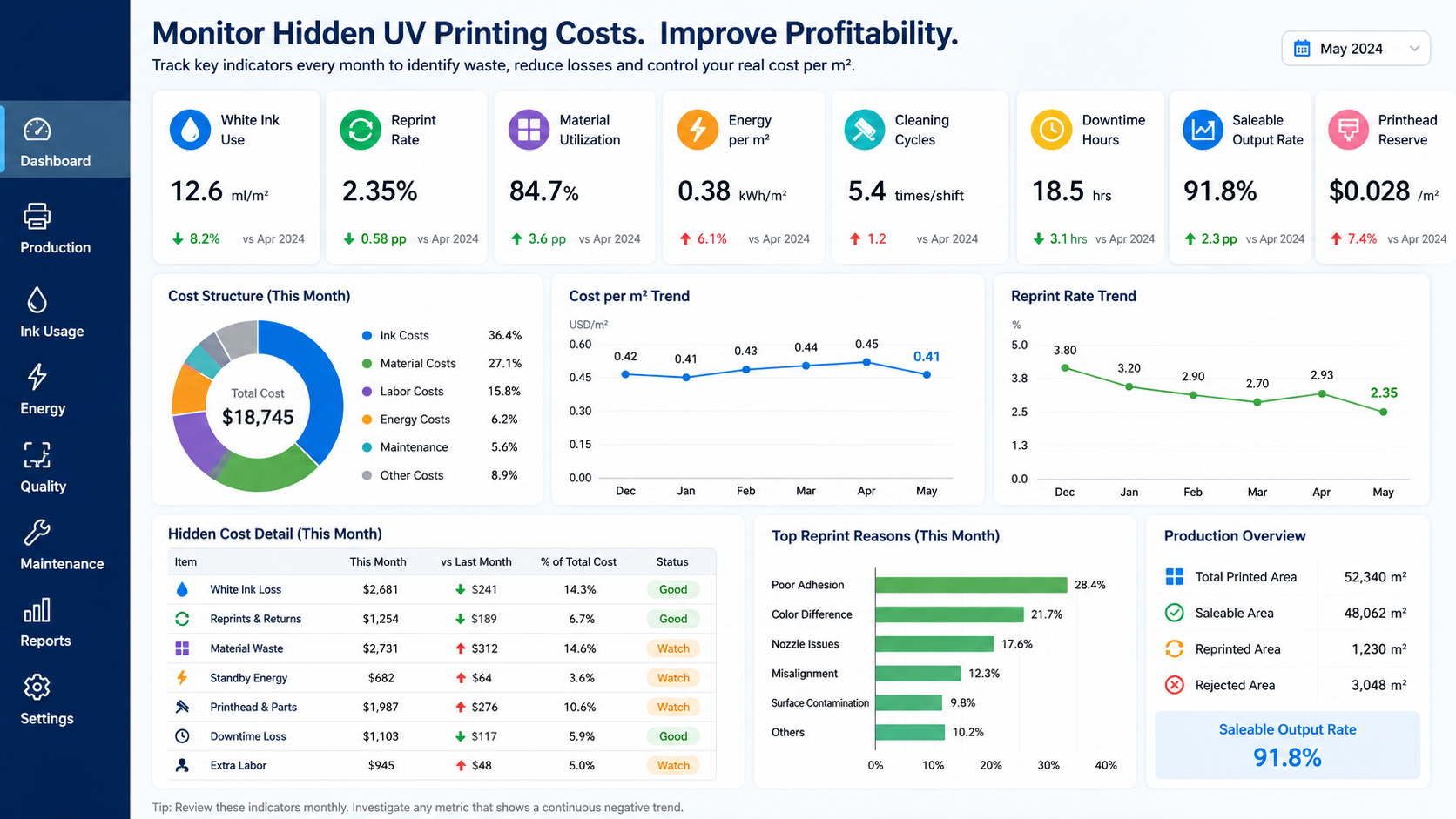
Hidden costs cannot be controlled until they are recorded. A simple monthly dashboard can reveal whether
ink use, waste, cleaning frequency or downtime is moving outside the normal range.
Create a Monthly Hidden-Cost Dashboard
| KPI | Calculation | What It Reveals |
|---|---|---|
| White ink use per m² | White ink consumed ÷ Saleable white-print area | Abnormal white ink loss or excessive layers |
| Reprint rate | Reprinted area ÷ Total printed area | Quality and process losses |
| Material utilization | Saleable product area ÷ Total material area | Layout and nesting efficiency |
| Energy per m² | Total electricity used ÷ Saleable printed area | Production and standby energy efficiency |
| Cleaning cycles per shift | Total cleaning cycles ÷ Production shifts | Possible nozzle, ink or maintenance problems |
| Downtime hours | Fault-related non-production hours | Machine stability and support efficiency |
| Saleable output rate | Saleable output ÷ Total printed output | Actual production efficiency |
| Printhead reserve per m² | Annual printhead budget ÷ Annual saleable area | Long-term printhead risk included in pricing |
Separate Normal Consumption from Abnormal Loss
Normal Production Cost
- Necessary ink coverage
- Normal electricity consumption
- Planned preventive maintenance
- Required test printing
- Reasonable board margins
- Scheduled replacement of routine consumables
Abnormal Hidden Loss
- Repeated strong cleaning
- Unexplained increases in white ink use
- Poor nesting and unused material
- Repeated customer reprints
- Long fault-related downtime
- Premature printhead replacement
Review Costs by Product Type
A factory-wide average may hide important differences. Acrylic signs, metal nameplates, glass panels,
wood products, promotional gifts and embossed jobs do not use the same amount of ink, labor or material.
Calculate costs separately for major product groups. This makes it easier to identify which applications
are profitable and which require higher prices or better production control.
Practical Tips to Control Hidden UV Printing Costs
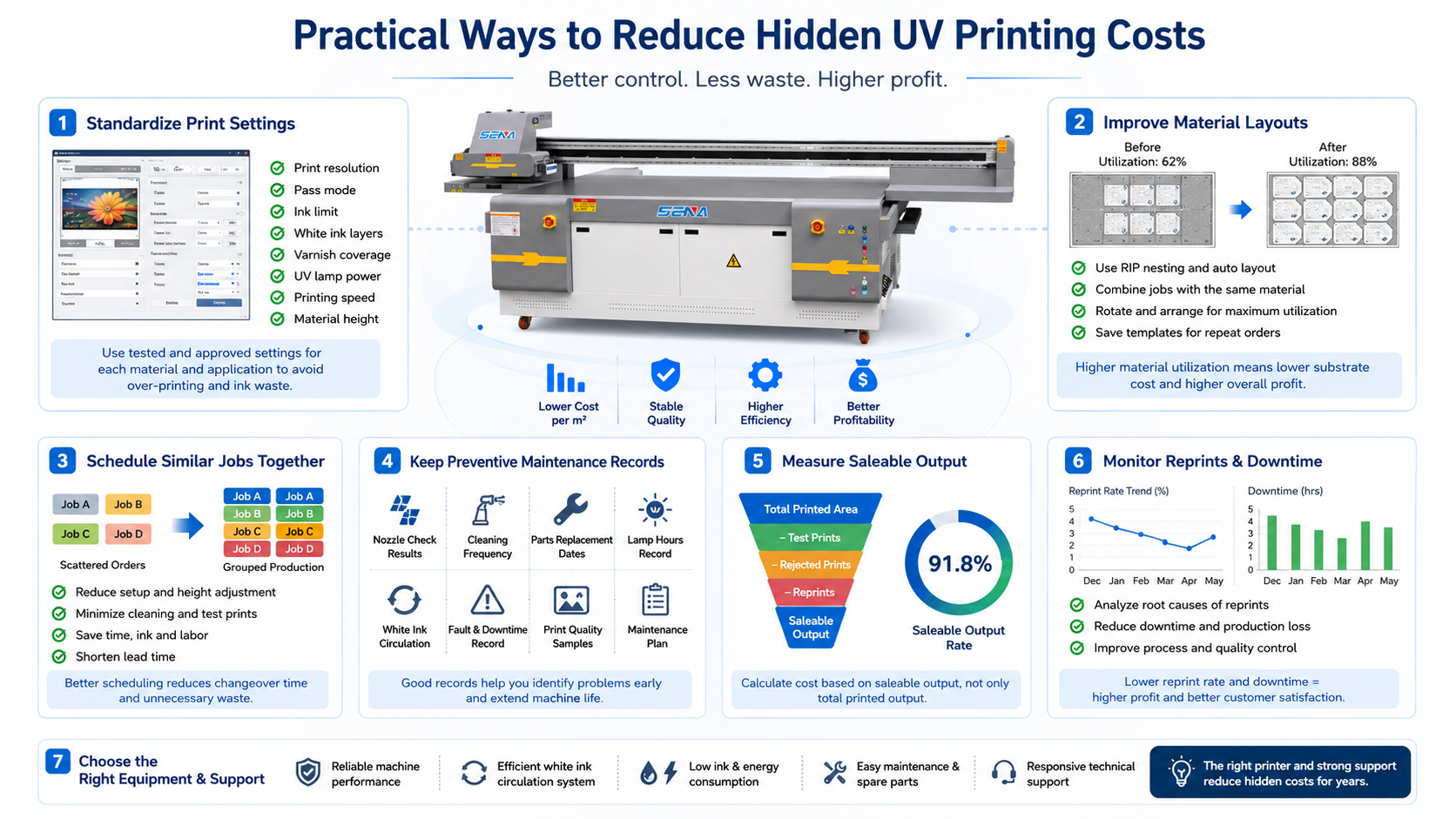
Standardize Print Settings
Create approved settings for frequently used materials, including:
- Print resolution
- Pass mode
- Color ink limit
- White ink layer count
- Varnish coverage
- UV lamp power
- Rychlost tisku
- Material height
Schedule Similar Jobs Together
Producing orders with similar materials, thicknesses and ink configurations together can reduce
repeated setup, height adjustment, test printing, material handling and cleaning.
Use Preventive Maintenance Records
Record nozzle condition, cleaning frequency, replacement dates, UV lamp operating hours,
white ink circulation status and fault-related downtime. A written record makes gradual changes easier to identify.
Measure Saleable Output, Not Only Printed Output
The most useful productivity figure is the amount that passes inspection and can be delivered.
A high printing speed is not valuable when it is followed by frequent reprints or rejected products.
Ask Suppliers for Real Operating Information
Before purchasing a UV printer, ask the supplier about:
- White ink circulation and cleaning mechanisms
- Typical ink consumption under different print modes
- Standby and production power
- Daily and long-term maintenance procedures
- Recommended spare parts
- Printhead protection functions
- Technical support response time
- International spare-parts delivery time
Selecting the correct machine size and configuration can also reduce hidden costs.
Read:
How to Choose the Right UV Printer for Your Products and Applications
.
Často kladené otázky
There is no single answer for every business. White ink loss, poor material utilization,
customer reprints, premature printhead failure and downtime are often among the largest hidden costs.
The biggest factor depends on the company’s products, production volume and maintenance practices.
How much white ink does a UV printer waste?
White ink loss depends on the ink circulation design, cleaning frequency, print coverage,
shutdown procedures and maintenance condition. A fixed waste percentage cannot accurately represent every printer.
The most reliable method is to compare the total white ink added with the saleable white-ink printed area.
Does a UV printer consume electricity while idle?
Yes. The control system, negative pressure pump, white ink circulation and supporting equipment may continue operating.
Record standby hours separately from active printing hours to understand the real energy cost.
How does UV lamp performance affect printing cost?
Insufficient curing can cause tacky surfaces, weak adhesion, scratches and customer complaints.
The resulting reprint can require new material, ink, labor, packaging and delivery.
How can I reduce UV ink cost per m²?
Use suitable ICC and RIP settings, limit total ink coverage, reduce unnecessary white layers,
apply varnish only where required and control cleaning and reprint losses.
How do I calculate UV printing material waste?
Subtract the area of saleable products from the total material area used.
Reusable offcuts should be recorded separately from material that must be discarded.
How often should a UV printhead be replaced?
There is no universal replacement period. Printhead life depends on the printhead type, ink compatibility,
maintenance, operating environment, production intensity, material height control and operator practices.
Conclusion: Hidden Costs Must Be Measured Before They Can Be Reduced
Hidden UV printing costs do not appear clearly in the machine quotation, but they can gradually reduce the profit
of every order. White ink loss, curing problems, excessive ink coverage, inefficient layouts,
standby power, premature printhead failure and customer reprints all affect the real cost per square meter.
The first step is to calculate costs using saleable output rather than total printed output.
The next step is to record white ink use, material utilization, energy per square meter,
cleaning frequency, downtime and reprint rate every month.
Standardized print settings, preventive maintenance, better production scheduling and accurate cost records
help a UV printing business reduce waste while maintaining stable quality.
Need Help Estimating Your UV Printing Cost?
Send us your printing material, product size, ink configuration and expected monthly output.
Our team can help you evaluate a suitable UV printer configuration and identify the operating costs
that should be included in your production plan.